How to Make AI Dating Photos Look Realistic and Not AI-Generated
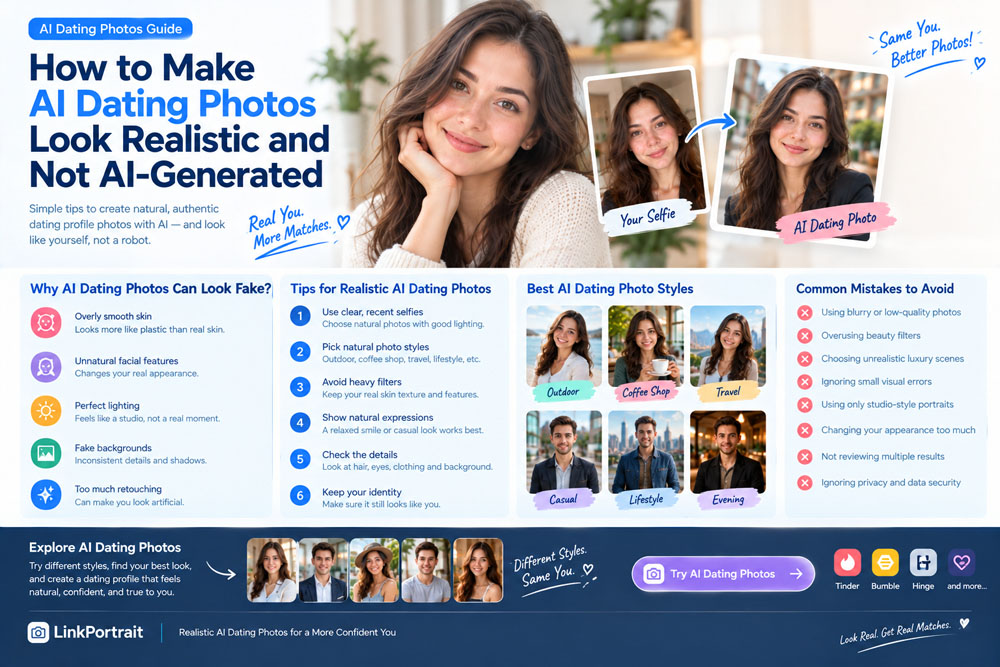
AI dating photos can help you create polished, eye-catching pictures for Tinder, Bumble, Hinge, and other dating apps. But there is one common concern: How do you make AI-generated dating photos look natural instead of obviously artificial?
You've probably seen portraits with overly smooth skin, strangely perfect lighting, unrealistic backgrounds, or facial features that don't quite look human. While these images may look attractive at first glance, they can also feel artificial and fail to represent the person in the photo accurately.
The good news is that you can improve the realism of your AI dating photos by choosing better reference selfies, selecting natural photo styles, avoiding excessive retouching, and carefully reviewing the final results.
In this guide, we'll explain how to create realistic AI dating photos, which styles tend to look more authentic, what mistakes to avoid, and how to use AI-generated pictures while keeping your dating profile honest and recognizable.
What Makes AI Dating Photos Look Fake?
Before improving your AI dating photos, it helps to understand what makes an image appear artificial.
AI-generated portraits often look less realistic when several small details don't match what people expect from an ordinary photograph.
1. Skin That Looks Too Smooth
Real skin has texture, subtle color variations, and natural details.
When an AI-generated portrait removes nearly every pore, line, and imperfection, the face can look more like a plastic doll than a real person.
Excessive smoothing is especially noticeable in close-up portraits.
2. Unnatural Facial Features
Some AI tools subtly change facial proportions, eye shapes, smiles, jawlines, or other identifying features.
The result may look attractive but no longer resemble the person in the original selfie.
For dating profiles, this is a significant problem because people generally expect profile photos to represent your actual appearance.
3. Perfect but Unrealistic Lighting
Professional lighting can improve a portrait, but lighting that looks excessively polished may make a casual dating photo feel like a commercial advertisement.
For example, a supposedly spontaneous coffee-shop picture with flawless studio lighting and perfectly illuminated hair may appear inconsistent with its setting.
4. Unnatural Poses and Expressions
An exaggerated smile, stiff shoulders, overly symmetrical facial expression, or awkward hand position can make a portrait look generated.
Natural-looking dating photos usually benefit from relaxed expressions and believable body language.
5. Backgrounds That Don't Match the Person
AI-generated backgrounds can contain strange reflections, distorted objects, inconsistent shadows, or details that don't make sense.
A realistic face placed in an obviously artificial environment can still make the entire photograph look fake.
6. Excessive Beauty Enhancements
Unrealistically white teeth, dramatically altered body proportions, flawless skin, and exaggerated facial symmetry can make the image feel heavily edited.
A good dating photo should enhance presentation without turning you into someone else.
1. Start With High-Quality Reference Selfies
One of the most important steps in creating realistic AI dating photos happens before you generate anything: choosing your original photos.
AI tools rely on the information available in your reference images. If your selfies are blurry, heavily filtered, or taken under unusual lighting, the results may be less consistent.
Choose Recent Photos
Use photos that reflect your current appearance.
If your hairstyle, facial hair, weight, or overall look has changed significantly, older selfies may cause the generated results to look inconsistent.
Use Clear, Well-Lit Images
Natural daylight is a good starting point.
Try taking a photo near a window or outdoors in open shade. Avoid harsh sunlight, extremely dark rooms, and colored lighting that changes your skin tone.
Avoid Heavy Filters
Beauty filters can alter your eyes, nose, skin texture, and face shape.
For more realistic AI dating photos, use reference images that preserve your natural features.
Include Different Angles When Supported
Some AI generators work with a single image, while others request several reference photos.
If multiple photos are supported, provide clear images showing your face from slightly different angles and with different natural expressions.
Follow the tool's upload requirements rather than assuming every generator needs the same number of selfies.
Quick tip: Your reference photos don't need to be professional. Clear facial details and an accurate representation of your current appearance are more useful than a heavily edited selfie.
2. Choose Natural Dating Photo Styles
The style you select can have a major influence on how realistic the final image appears.
For most dating profiles, everyday settings are a sensible starting point because they resemble photographs people commonly take in real life.
Here are some styles worth trying.
Casual Outdoor Photos
Outdoor portraits can look natural when the lighting, clothing, and background are consistent.
Examples include:
Walking through a park
Sitting on a bench
Exploring a city street
Relaxing in an outdoor café
Standing near trees in soft daylight
Choose a setting that suits your personality rather than automatically selecting a dramatic travel destination.
Coffee Shop Photos
A coffee-shop portrait can create a relaxed, approachable impression.
Simple clothing, natural window light, and a casual expression can help the image feel believable.
Avoid overly elaborate backgrounds or poses that make an everyday moment look staged.
Travel and Lifestyle Photos
Travel-style images can add variety to your dating profile.
A street scene, a scenic viewpoint, or a casual outdoor portrait may communicate your interests and lifestyle.
However, the photo should not imply that you visited a destination or experienced an event that never happened.
Casual Portraits
A simple portrait with a neutral or softly blurred background can be an excellent option for your main dating profile photo.
The focus stays on your face, reducing distractions and making visual inconsistencies easier to notice.
Candid-Style Photos
Images that appear to capture a natural moment can work well when the expression and body language look believable.
For example, you might choose a relaxed smile or a slightly angled pose instead of a perfectly symmetrical, straight-on portrait.
Remember that a candid-looking image is still generated if AI created the scene. Choose styles that feel natural without suggesting that a fictional moment actually happened.
3. Avoid Overly Perfect AI Dating Photos
A common mistake is assuming that the most polished image is automatically the best one.
In reality, an extremely glamorous portrait can feel less authentic than a simpler photograph.
When reviewing generated images, look for the following warning signs.
| Detail | What to look for |
|---|---|
| Skin texture | Natural-looking detail rather than plastic-like smoothing |
| Eyes | Consistent shape, realistic reflections, and natural alignment |
| Smile | Believable teeth and relaxed facial muscles |
| Hair | Natural strands and a plausible hairline |
| Lighting | Shadows and highlights that match the environment |
| Clothing | Realistic fabric, collars, buttons, and folds |
| Background | Consistent perspective and believable objects |
| Body proportions | Natural anatomy and consistent proportions |
No single imperfection automatically makes an image unusable. What matters is whether the overall photo looks convincing and accurately represents you.
If a result contains obvious errors, try another generation rather than spending too much time trying to fix an image with fundamental problems.
4. Use Natural Expressions Instead of Forced Smiles
Your expression can influence whether a dating portrait feels authentic.
You don't need to smile in every photo, and a serious expression isn't automatically more attractive.
Instead, experiment with expressions that suit your personality.
A Relaxed Smile
A natural smile can help create a friendly impression.
Avoid exaggerated smiles that change your facial proportions or make your expression look uncomfortable.
A Subtle Smile
A slight smile can work well for close-up portraits and casual lifestyle photos.
This is a useful option if you rarely show your teeth when smiling.
A Relaxed Neutral Expression
A calm, neutral expression can provide variety across your profile.
Keep the jaw relaxed and avoid a stiff, intense stare.
A Candid Expression
A photo that appears to capture you laughing or enjoying a moment can add personality.
However, check that the mouth, eyes, and facial muscles look consistent. AI sometimes produces expressions that seem plausible at first but look unnatural on closer inspection.
For more tips, see our guide on Should You Smile in Dating Profile Pictures.
5. Keep Your Real Facial Features Consistent
If you want AI dating photos to look realistic, preserving your identity should be a priority.
A generated photo may have beautiful lighting and an attractive background, but it becomes less useful if it changes your appearance too much.
Before choosing an image, compare it with your recent real photos.
Ask yourself:
Does my face shape still look like mine?
Are my eyes and eyebrows consistent with my real appearance?
Does my nose look natural and recognizable?
Is my smile similar to my real smile?
Does my skin tone remain accurate?
Would someone who knows me recognize me easily?
Pay attention to the overall resemblance rather than just one feature.
If the generated image looks like an idealized stranger, try a different reference photo or a less stylized generation setting.
The best realistic AI dating photo should look like you on a good day, not like a completely different person.
6. Keep Clothing and Backgrounds Believable
Your clothing and surroundings should complement each other.
For example, casual clothes generally fit well in everyday outdoor settings, while a smart-casual outfit may suit a restaurant or urban portrait.
Here are some combinations to consider:
A simple T-shirt in a park
A casual shirt at a coffee shop
A sweater on a city street
A summer outfit at an outdoor location
A smart-casual look for an evening portrait
You don't need expensive clothing or luxury backgrounds to create an attractive dating photo.
In fact, simpler settings often make it easier to maintain visual realism.
Avoid combining an overly elaborate outfit, a dramatic background, perfect studio lighting, and a heavily retouched face in a photo that is supposed to look like an ordinary moment.
When those elements feel inconsistent, the image may look artificial.
7. Don't Overuse AI-Generated Photos on Your Dating Profile
AI dating photos can help you explore different styles, but using too many highly polished generated portraits may make your profile feel less personal.
A balanced profile can include a mixture of:
A clear main portrait
A casual everyday photo
A full-body photo
A genuine hobby or activity photo
A travel or social photo, when available
Use real photographs for activities, relationships, and experiences you want to represent accurately.
AI-generated portraits can supplement your existing photos, but they should not replace genuine evidence of your interests or imply that you have visited places you haven't been.
Quality and authenticity matter more than the number of generated images.
8. Can AI Dating Photos Still Look Like Real Photography?
Yes. AI-generated portraits can sometimes look very similar to ordinary photographs, particularly when the source images are clear and the selected style is restrained.
However, realism varies depending on the generator, reference photos, and settings.
To improve the results:
Use recent, clear selfies.
Select natural lighting and familiar environments.
Avoid excessive beauty enhancements.
Choose realistic clothing and poses.
Generate multiple variations when possible.
Inspect facial features and background details.
Reject images that noticeably distort your appearance.
It is also important to remember that visual realism does not make a generated image a real photograph of an event.
Use AI responsibly and avoid presenting fabricated experiences as genuine memories.
9. How to Create Realistic AI Dating Photos With LinkPortrait
If you want to refresh your dating profile without organizing a traditional photoshoot, LinkPortrait offers AI photo-generation options that can help you explore different portrait styles.
Here's a simple workflow to try.
Step 1: Select Your Best Reference Photos
Choose recent images with clear facial details and minimal filtering.
Step 2: Explore Dating Photo Styles
Consider casual, outdoor, lifestyle, and other styles that fit the impression you want to communicate.
Step 3: Generate Different Variations
Compare the results instead of automatically choosing the most glamorous image.
Step 4: Check Realism
Look closely at facial features, skin texture, lighting, clothing, and background details.
Step 5: Choose Authentic Results
Select images that remain recognizable and accurately represent your appearance.
You can explore LinkPortrait to see the available AI photo-generation options.
The goal is to create polished dating photos that complement your real appearance rather than replacing it with an artificial identity.
10. Common Mistakes That Make AI Dating Photos Look Fake
Before using an AI-generated photo, check that you haven't fallen into these common traps.
Using heavily filtered selfies: Filters can make it harder for the AI to preserve your natural features.
Choosing extreme beauty effects: Unrealistic skin smoothing and facial changes can make a portrait look artificial.
Generating unrealistic luxury scenes: An extravagant setting may feel disconnected from your actual lifestyle.
Ignoring small visual errors: Distorted hands, unusual teeth, inconsistent reflections, or strange background details can undermine realism.
Using only studio-style portraits: A profile filled with nearly identical polished headshots may feel repetitive and impersonal.
Changing your appearance too much: A generated image should not mislead people about your face, age, or body proportions.
Failing to compare results: Reviewing multiple variations can help you identify a more natural option.
Ignoring privacy: Before uploading selfies, check the service's privacy policy and how it handles your images.
Frequently Asked Questions
How can I make AI dating photos look more realistic?
Start with clear, recent reference selfies. Choose natural lighting, everyday settings, and realistic clothing. Avoid excessive skin smoothing, preserve your facial features, and carefully review the final images for visual errors.
Why do my AI dating photos look fake?
Common reasons include overly smooth skin, altered facial features, unrealistic lighting, unnatural expressions, distorted background details, and excessive beauty enhancements. Try using better reference photos and selecting a simpler style.
What is the best style for realistic AI dating photos?
Casual outdoor portraits, coffee-shop photos, simple close-ups, and everyday lifestyle settings are good starting points. The best style depends on your personality and the type of dating profile you want to create.
Can AI dating photos look exactly like me?
Not always. AI tools can change facial proportions or other identifying features. Compare generated portraits with your current appearance and reject images that make you look noticeably different.
Should I use AI dating photos on Tinder?
AI-generated photos may help you explore different portrait styles, but make sure they accurately represent your appearance and comply with the platform's current rules. Avoid misleading edits or images that suggest fictional experiences are real.
Are realistic AI dating photos better than real photos?
Neither is automatically better. Real photos document genuine moments, while AI-generated portraits can offer convenience and stylistic flexibility. For most profiles, accurate representation and a varied selection of genuine lifestyle images are more important than making every picture look perfect.
Can I create AI dating photos from a single selfie?
Some tools support a single reference image, while others require multiple photos. Check the specific generator's requirements and use the clearest available selfie for the best chance of a recognizable result.
Final Thoughts
Making AI dating photos look realistic isn't about removing every imperfection or creating the most glamorous version of yourself.
It's about choosing clear reference photos, using believable styles, preserving your facial features, and avoiding the visual effects that make generated portraits feel artificial.
Start with natural lighting and simple backgrounds. Experiment with relaxed expressions and everyday clothing. Review each result carefully before adding it to your dating profile.
Most importantly, keep your photos honest and recognizable.
AI can help you improve your presentation, but your dating profile should still reflect the person someone will meet in real life.
The best AI dating photos don't make you look like someone else. They help you present yourself naturally and confidently.