How to Create an ATS-Friendly Resume: A Complete Guide for 2026
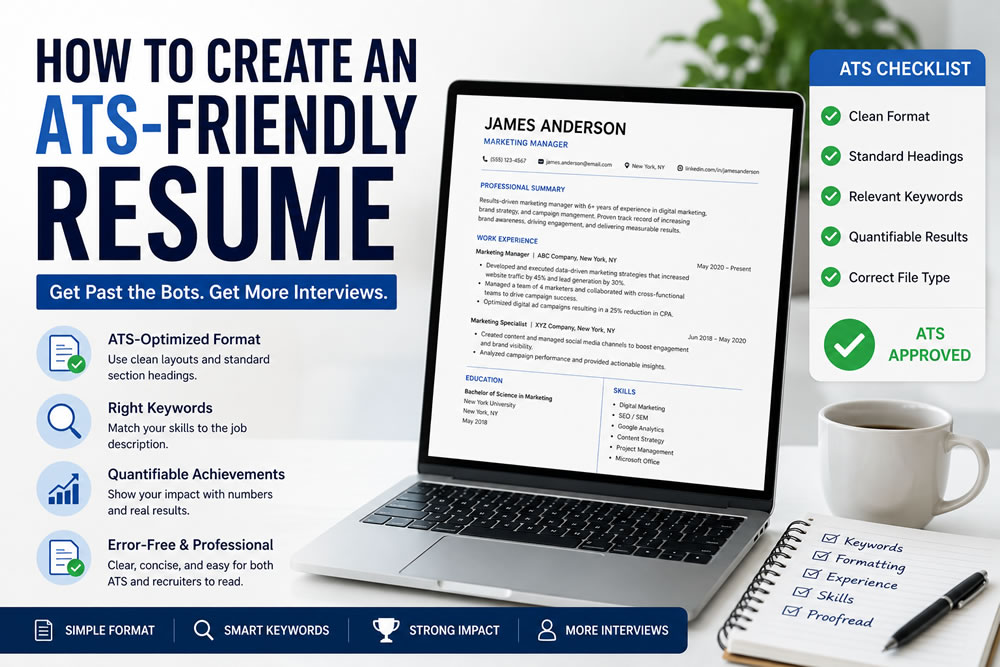
Landing an interview is no longer just about having the right skills—it’s also about making sure your resume can be read by Applicant Tracking Systems (ATS).
Today, most medium and large companies use ATS software to scan, organize, and rank resumes before a recruiter ever sees them. If your resume isn't ATS-friendly, it may never reach a hiring manager, even if you're highly qualified.
The good news is that creating an ATS-friendly resume isn't difficult. With the right structure, formatting, and keywords, you can significantly improve your chances of passing ATS screening and getting more interviews.
In this guide, you'll learn exactly how ATS works, common mistakes to avoid, and how to create a resume that performs well for both software and human recruiters.
What Is an ATS Resume?
An Applicant Tracking System (ATS) is software used by employers to collect, organize, and filter job applications.
Instead of reading every resume manually, recruiters often rely on ATS to identify candidates who match the job description.
The system analyzes information such as:
Work experience
Education
Skills
Certifications
Keywords
Job titles
Resumes that closely match the employer's requirements are typically ranked higher and forwarded to recruiters for review.
An ATS-friendly resume is designed to be easily parsed by these systems while remaining clear and professional for human readers.
Why ATS-Friendly Resumes Matter
Studies show that a large percentage of employers use ATS software during the hiring process.
If your resume contains complicated layouts, missing keywords, or formatting errors, important information may not be recognized correctly.
An ATS-friendly resume can help you:
Increase your chances of passing the initial screening
Improve resume readability
Match relevant job descriptions
Save recruiters time
Present your qualifications more clearly
Remember, ATS doesn't replace recruiters—it helps them identify the most relevant candidates more efficiently.
1. Choose a Simple Resume Format
One of the biggest mistakes job seekers make is using overly designed resume templates.
While creative layouts may look attractive, many ATS systems struggle to read:
Multiple columns
Text boxes
Complex graphics
Decorative icons
Tables used for layout
Instead, choose a clean, single-column design.
Recommended sections include:
Contact Information
Professional Summary
Work Experience
Education
Skills
Certifications (if applicable)
A simple structure improves compatibility across different ATS platforms.
2. Use Standard Section Headings
ATS software recognizes common headings more accurately than creative alternatives.
Use headings such as:
Professional Summary
Work Experience
Education
Skills
Certifications
Projects
Languages
Avoid replacing them with custom titles like:
My Journey
Career Story
What I Know Best
Standard headings improve parsing accuracy.
3. Tailor Your Resume for Every Job
One resume does not fit every application.
Before submitting your resume:
Read the job description carefully.
Identify important:
Skills
Software
Certifications
Industry terminology
Responsibilities
Then naturally incorporate those keywords into your resume where appropriate.
Avoid keyword stuffing.
Your resume should always read naturally.
4. Include Relevant Keywords
Keywords are one of the most important ranking factors in ATS systems.
For example, if a job description mentions:
Project Management
SQL
Python
Customer Success
Salesforce
and you have experience with those skills, include them naturally in your resume.
Use the same terminology employers use whenever possible.
5. Write a Strong Professional Summary
Your professional summary should quickly explain who you are and what value you bring.
A strong summary usually includes:
Years of experience
Industry
Key skills
Career achievements
Career goals
Example:
Results-driven marketing professional with five years of experience in digital marketing, SEO, and content strategy. Proven ability to increase organic traffic and lead successful cross-functional campaigns.
Keep it concise—three to five sentences are usually enough.
6. Focus on Achievements, Not Responsibilities
Recruiters want to understand your impact, not just your daily tasks.
Instead of writing:
Responsible for managing social media accounts.
Write:
Increased social media engagement by 45% within six months through targeted content campaigns.
Whenever possible, quantify your achievements using:
Percentages
Revenue
Time savings
Team size
Project outcomes
Numbers help demonstrate measurable success.
7. Use a Professional Font
Choose readable fonts such as:
Arial
Calibri
Helvetica
Georgia
Recommended font size:
Headings: 12–14 pt
Body text: 10–12 pt
Avoid decorative fonts that may reduce readability.
8. Save Your Resume in the Right Format
Most employers accept:
PDF
DOCX
Always read the job posting carefully.
Some ATS systems prefer DOCX, while others accept PDF without issues.
If the employer specifies a format, follow those instructions exactly.
9. Optimize Your Skills Section
Your skills section should be easy to scan.
Group skills into categories when appropriate.
Example:
Technical Skills
Python
SQL
Excel
Power BI
Marketing Skills
SEO
Google Analytics
Content Marketing
Soft Skills
Leadership
Communication
Problem Solving
Keep the list relevant to the position you're applying for.
10. Proofread Before You Submit
Small mistakes can make a negative impression.
Before submitting your resume:
✓ Check spelling
✓ Review grammar
✓ Verify dates
✓ Confirm company names
✓ Test formatting on different devices
Ask a friend or use an AI proofreading tool to review your resume before sending it.
Common ATS Resume Mistakes
Avoid these common errors:
Using graphics or charts
Adding photos
Overusing colors
Including unnecessary personal information
Copying keywords without context
Using inconsistent date formats
Keeping your resume simple often leads to better ATS compatibility.
ATS-Friendly Resume Checklist
Before applying for a job, ask yourself:
✓ Is my resume tailored to this job?
✓ Did I include relevant keywords?
✓ Is my layout simple?
✓ Are my section headings standard?
✓ Are my achievements measurable?
✓ Is my file format correct?
✓ Did I proofread everything?
If you answered "yes" to each question, your resume is ready to submit.
Should You Use an AI Resume Builder?
AI resume builders have become increasingly popular because they simplify the resume creation process.
A quality AI resume builder can help you:
Generate ATS-friendly layouts
Improve wording
Optimize keywords
Create professional summaries
Reduce formatting errors
Save time
Rather than starting from a blank page, AI tools provide a strong foundation that you can customize for each application.
Final Thoughts
Creating an ATS-friendly resume isn't about tricking the software.
It's about presenting your qualifications in a clear, structured, and searchable format that works well for both ATS systems and recruiters.
By using a clean layout, relevant keywords, measurable achievements, and professional formatting, you'll improve your chances of passing the initial screening and getting more interviews.
Remember to customize your resume for every application and keep it updated as your experience grows.
Build an ATS-Friendly Resume with AI
Want to create a professional resume faster?
Use LinkPortrait's AI Resume Builder to generate ATS-friendly resumes, improve your content, and customize your resume for every job application—all in minutes.
Start building your professional resume today.