Are AI Headshots Good Enough for Professional Use?
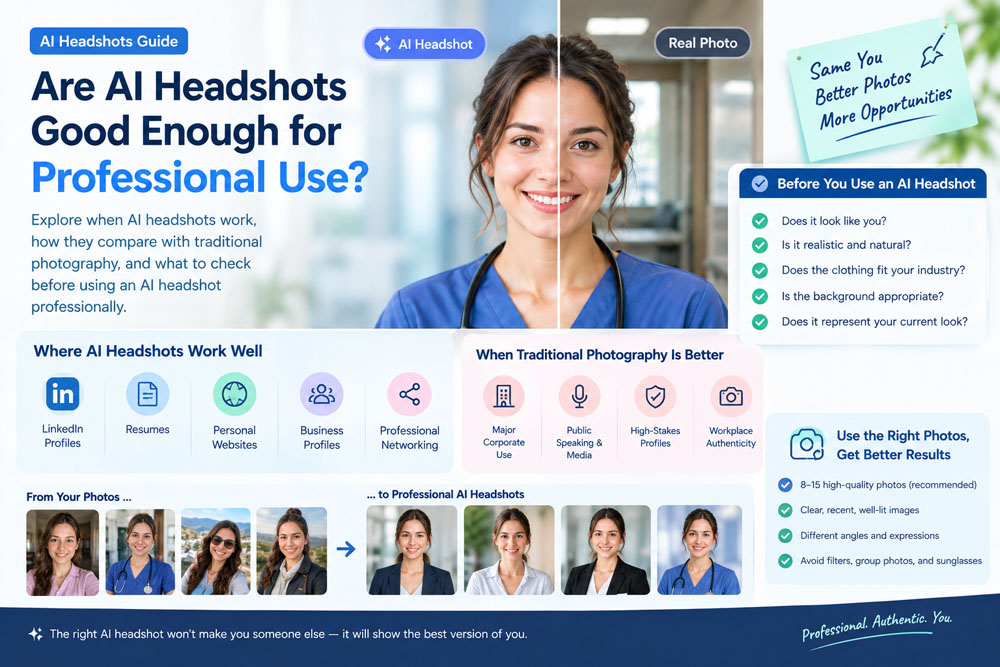
A professional headshot used to require a photographer, a studio, professional lighting, and several hours of preparation.
Today, AI headshot generators have changed that process.
With just a few personal photos, AI can create polished portraits with professional backgrounds, lighting, clothing, and compositions in minutes. This raises an important question:
Are AI headshots actually good enough for professional use?
The short answer is yes—for many professional situations, AI headshots can be good enough.
But there is an important distinction between a realistic professional headshot and an image that simply looks impressive.
For LinkedIn profiles, resumes, personal websites, business profiles, and professional social media, a high-quality AI headshot can be a practical alternative to traditional photography. However, the quality of the original photo, the AI model, the amount of editing, and how the final image is used all matter.
In this guide, we'll look at when AI headshots work well, where they can fall short, and how to decide whether an AI-generated headshot is appropriate for your professional needs.
What Is an AI Headshot?
An AI headshot is a professional-looking portrait created or enhanced using artificial intelligence.
Instead of visiting a photography studio, you provide the AI with photos of yourself. The system analyzes your facial features and generates new portraits based on different professional styles.
Depending on the platform, you may be able to create headshots with different:
- Backgrounds
- Clothing
- Lighting
- Poses
- Facial expressions
- Camera compositions
- Professional environments
For example, someone might upload several smartphone selfies and generate portraits designed for LinkedIn, a resume, a company website, or professional networking.
This makes AI headshots particularly attractive to people who need professional photos quickly without organizing a traditional photo session.
Can AI Headshots Look Professional?
Yes.
Modern AI image-generation technology can produce highly realistic professional portraits.
A well-made AI headshot can include many of the characteristics people expect from a traditional professional photograph:
- Natural-looking lighting
- Sharp facial details
- Professional clothing
- Clean backgrounds
- Appropriate framing
- Realistic skin texture
- Natural facial expressions
- Professional composition
For a small LinkedIn profile image, for example, a high-quality AI headshot can be difficult to distinguish from a traditional studio portrait.
However, not every AI-generated image reaches this level.
Some images may still contain subtle problems such as unnatural skin, strange accessories, distorted clothing, unrealistic hair, or facial details that don't quite look right.
That's why quality control is extremely important.
When Are AI Headshots Good Enough for Professional Use?
AI headshots can work particularly well for situations where the image is primarily being used to create a polished professional online presence.
1. LinkedIn Profile Photos
This is one of the strongest use cases for AI headshots.
Your LinkedIn profile photo is relatively small, meaning viewers are primarily looking at your face and overall impression.
A professional AI headshot can provide:
- Better lighting
- A cleaner background
- More professional clothing
- Better composition
- A consistent visual style
For job seekers and professionals updating their LinkedIn profiles, AI headshots can be a convenient solution.
2. Resume Photos
Whether you should include a photo on your resume depends heavily on the country, industry, and type of position you're applying for.
In markets where resume photos are commonly used, a professional AI headshot can be suitable if it accurately represents you.
However, in the United States and some other markets, resumes generally do not include photos because employers may want to avoid potential discrimination concerns.
So before using an AI headshot on a resume, consider the hiring norms of your target country and industry.
3. Professional Websites
If you're a freelancer, consultant, entrepreneur, designer, developer, coach, or other independent professional, your personal website may benefit from a professional portrait.
An AI headshot can work well for:
- About pages
- Team pages
- Author profiles
- Speaker profiles
- Professional bios
- Personal branding pages
A polished image can make a website feel more complete and professional.
4. Business Profiles
AI headshots can also be useful for business-related profiles.
For example:
- Company employee profiles
- Professional directories
- Business networking platforms
- Conference profiles
- Online portfolios
- Personal branding pages
The key is consistency.
If you're using AI headshots for an entire team, it can be helpful to maintain a consistent visual style while ensuring each person's appearance remains authentic.
When Should You Use a Traditional Photographer Instead?
AI headshots aren't the right solution for every situation.
There are cases where traditional photography remains the better choice.
Important Corporate Photography
If you're creating photographs for a major corporate website, annual report, press release, or executive announcement, a professional photographer may be preferable.
A photographer can capture the actual person, environment, and company branding rather than generating a synthetic image.
High-Stakes Public Profiles
If your image is going to be used extensively in:
- Press coverage
- Public speaking
- Major publications
- Official corporate materials
- Legal or regulatory contexts
an actual photograph may be more appropriate.
When Authenticity Is Critical
Some professions and situations place particularly high value on visual authenticity.
For example, if a company wants to photograph its employees inside an actual workplace, AI-generated images may not accurately represent the real environment or person.
AI can create a professional portrait, but it shouldn't be used to misrepresent someone's identity, qualifications, workplace, or professional role.
AI Headshots vs. Traditional Headshots
So how do AI headshots compare with traditional professional photography?
| Factor | AI Headshots | Traditional Photography |
|---|---|---|
| Cost | Usually lower | Usually higher |
| Speed | Minutes | Hours or days |
| Convenience | Very high | Requires scheduling |
| Location | Flexible | Physical location required |
| Clothing options | Can generate variations | Requires actual wardrobe |
| Background options | Many | Limited by setup |
| Retakes | Easy to generate variations | Requires another session |
| Authenticity | Depends on AI quality | Naturally authentic |
| Customization | High | High |
| Best for | Online professional profiles | High-end professional photography |
Neither option is automatically better.
The right choice depends on how the photograph will be used.
The Biggest Factor: Does It Actually Look Like You?
This is probably the most important test for an AI headshot.
An AI-generated portrait can look beautiful while still being a bad professional photo if it doesn't accurately represent you.
Ask yourself:
Would someone who knows me recognize this photo immediately?
If the answer is yes, that's a good sign.
If the image changes your:
- Face shape
- Nose
- Eyes
- Jawline
- Skin tone
- Age
- Hairline
- Facial structure
too dramatically, it may not be suitable.
The purpose of an AI headshot isn't to create a fictional version of you.
It's to create a professional version of your real appearance.
Why Some AI Headshots Look Fake
AI-generated portraits can fail in several ways.
Over-Retouched Skin
Excessively smooth skin can make the image look artificial.
Unrealistic Eyes
Eyes are one of the most noticeable elements in a portrait. Small inconsistencies can immediately make an image feel synthetic.
Strange Hair
AI sometimes creates unrealistic hair strands, hairlines, or hairstyles.
Incorrect Clothing Details
Buttons, collars, jewelry, glasses, and other small details can occasionally look unnatural.
Overly Perfect Lighting
A portrait with completely flawless lighting and skin can sometimes feel less realistic than a slightly imperfect real photograph.
Wrong Facial Expression
An AI-generated smile may not resemble your natural expression.
These problems are why you should never automatically use the first AI image you generate.
Review the results carefully before publishing them.
How to Get Better AI Headshots
The quality of your final image depends heavily on the quality of your source photos.
You don't necessarily need professional photography.
A modern smartphone can be enough.
Start with photos that are:
- Recent
- Clear
- Well lit
- High resolution
- Unfiltered
- Individually focused
- Free from sunglasses
- Free from heavy facial obstructions
Try to provide several different angles and natural expressions.
For more information, see our guide on How Many Photos Do You Need for AI Headshots?
The goal is to give the AI enough information to understand what you actually look like.
Choose a Professional Style That Matches Your Industry
Another important consideration is the style of your AI headshot.
A professional headshot doesn't have to mean a black suit against a white background.
Different professions have different expectations.
Corporate Professionals
A clean studio background, business attire, and confident expression may work well.
Technology Professionals
A modern business-casual look can feel professional without appearing overly formal.
Healthcare Professionals
A clean, approachable portrait may be more appropriate than an overly corporate image.
Creative Professionals
You may have more freedom to use interesting backgrounds, colors, and clothing.
Executives
A polished business portrait with controlled lighting and a sophisticated background may be appropriate.
The best AI headshot is not necessarily the most formal one.
It's the one that fits your professional identity.
AI Headshots Can Save More Than Money
One of the biggest advantages of AI headshots isn't simply price.
It's convenience.
Traditional photography often requires:
- Finding a photographer
- Scheduling a session
- Traveling to the location
- Preparing clothing
- Taking dozens of photographs
- Waiting for editing
- Selecting the final images
AI can dramatically simplify this process.
You can create multiple professional variations without leaving your home.
This can be particularly useful when you need to update your professional image quickly.
For example, you may need a new headshot because:
- You're starting a new job
- You're applying for jobs
- You're updating LinkedIn
- You're launching a website
- You're creating a professional portfolio
- You're changing careers
- Your existing photo is several years old
Instead of waiting weeks, you may be able to create a new professional portrait much faster.
What About AI Headshots for LinkedIn?
LinkedIn is probably one of the best environments for AI headshots.
A professional LinkedIn photo should generally be:
Clear + Current + Professional + Approachable
Your photo doesn't need to look like it was taken by a luxury fashion photographer.
In fact, an overly stylized portrait may work against you.
A simple professional portrait with:
- Natural facial expression
- Clean background
- Appropriate clothing
- Good lighting
- Realistic skin
- Accurate facial features
can be more effective.
If you're specifically creating a LinkedIn portrait, you can also read our guides on How to Take a Professional LinkedIn Photo at Home and What to Wear for a LinkedIn Headshot.
Should You Tell People Your Headshot Is AI-Generated?
There isn't one universal rule.
For casual professional profiles, the important consideration is whether the image accurately represents you.
However, transparency becomes more important when an image could reasonably be interpreted as a documentary photograph or a representation of an actual event, workplace, or person.
For example, don't use an AI-generated image to suggest:
- You were photographed at a workplace where you weren't
- You hold a credential you don't have
- You work for an organization you don't work for
- You attended an event you didn't attend
- A product or environment actually exists when it doesn't
Use AI to improve your professional presentation—not to create false evidence.
A Simple Test Before You Use an AI Headshot
Before uploading your AI headshot to LinkedIn or another professional platform, perform these five checks.
Test 1: Recognition
Would people who know you recognize you?
Test 2: Realism
Does the image look like an actual photograph?
Test 3: Professional Fit
Does the clothing and background make sense for your career?
Test 4: Detail
Look closely at your eyes, teeth, hair, ears, glasses, clothing, and skin.
Do anything look strange?
Test 5: Authenticity
Does the image represent how you realistically look today?
If all five tests pass, your AI headshot may be perfectly suitable for professional use.
Are AI Headshots Good Enough for Professional Use in 2026?
For many people, yes.
AI headshots have reached a point where high-quality results can be suitable for a wide range of everyday professional applications.
They're particularly useful for:
- LinkedIn profiles
- Professional social media
- Personal websites
- Online portfolios
- Business profiles
- Networking platforms
- Certain resume applications
But AI doesn't eliminate the need for judgment.
The technology can generate the image.
You still need to decide whether the image is appropriate.
A professional AI headshot should be realistic, recognizable, and consistent with your actual professional identity.
How LinkPortrait Can Help
If you need a professional headshot but don't want to arrange a traditional photo session, LinkPortrait provides a simple way to explore AI-generated professional portraits using your own photos.
You can create professional-looking variations for purposes such as:
- Career profiles
- Professional websites
- Resume-related materials
- Business profiles
- Personal branding
The best results come from starting with clear, recent photos and selecting an AI-generated result that still looks authentically like you.
Final Verdict: Are AI Headshots Good Enough?
AI headshots can absolutely be good enough for professional use—but quality matters.
For everyday professional applications such as LinkedIn, personal websites, online portfolios, and business profiles, a high-quality AI headshot can be a practical and convenient alternative to traditional photography.
However, don't choose an image simply because it looks impressive.
Choose one that:
- Looks like you
- Represents your current appearance
- Fits your industry
- Looks realistic
- Has natural facial details
- Creates a professional first impression
The goal isn't to create a perfect fictional portrait.
The goal is to create a professional image of the real you.
As AI headshot technology continues to improve, the difference between AI-generated portraits and traditional studio photography will continue to become less noticeable.
For many professionals, that means getting a polished headshot no longer requires a studio, expensive equipment, or a full-day photography session.